Loyalty
Summary
Section titled “Summary”Loyalty programmes reward customers with points that unlock benefits as they accumulate. This module in Teepee is used to create and manage the loyalty programme for a site.
There are three types of loyalty programme:
- Multi-Tiered – customers are classified into tiers based on their points total, with each tier offering increasing rewards
- Redeemable Points – customers can convert their points into account credit at defined redemption rates
- Hybrid – combines both tiered and redeemable points functionality into a single programme. Customers earn points that determine their tier and can also be redeemed for account credit. Redeeming points does not affect the customer’s tier – the total points earned (including redeemed points) is what counts towards tier qualification
Setting Up a Loyalty Programme
Section titled “Setting Up a Loyalty Programme”The loyalty programme setup in Teepee is split into four sections: Points, Programmes, Opt-In, and Review.
Step 1: Points
Section titled “Step 1: Points”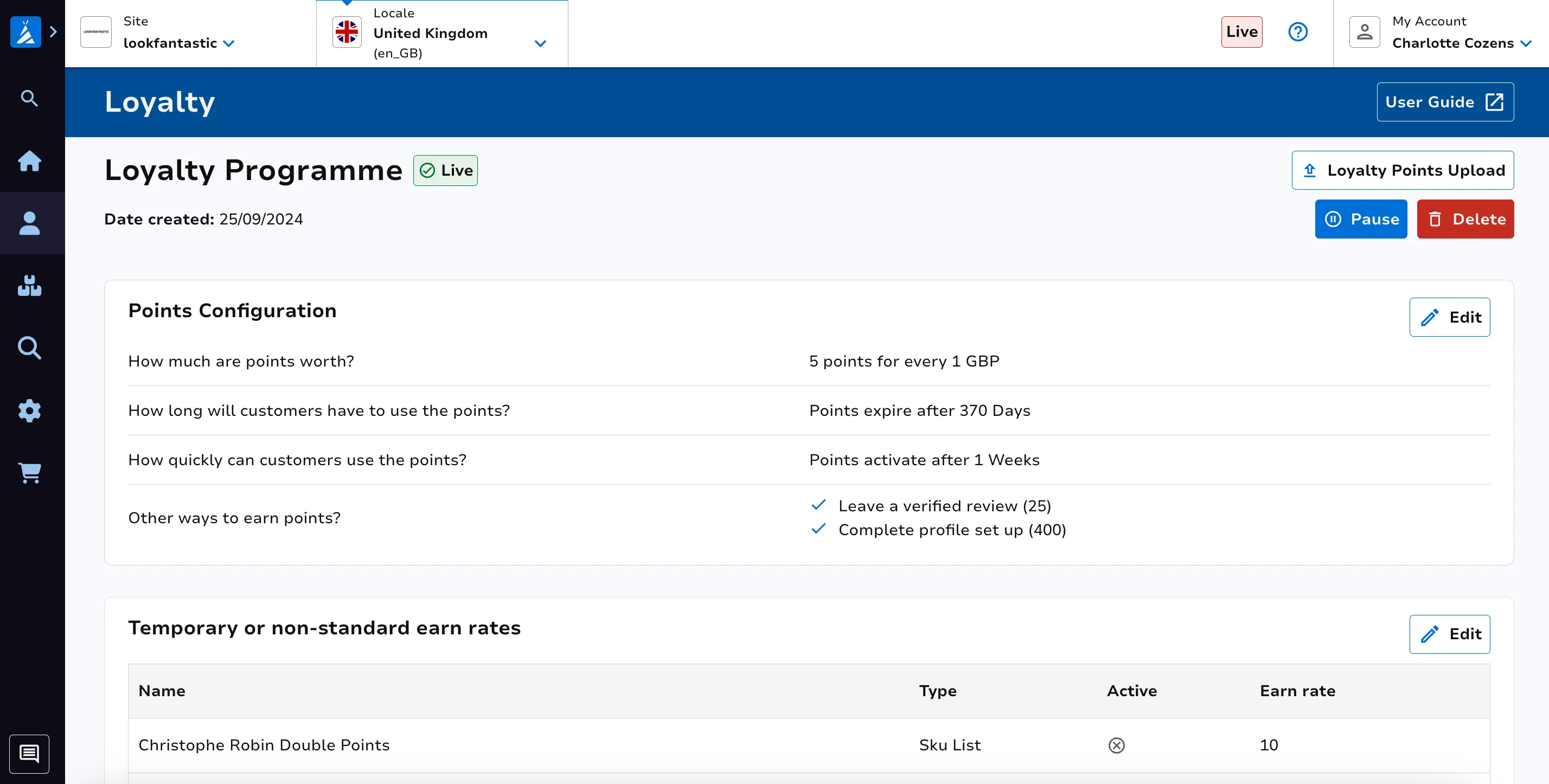
Configure how customers earn and retain points:
- Earn rate – how many points customers earn per unit of currency spent (e.g. “Earn 1 point for every 1 GBP spent”)
- Validity period – how long points remain active on a customer’s account before expiring (maximum 365 days), or points can be set to never expire. Setting a limited validity encourages customers to stay active
- Holding window – how long after dispatch before points become available for use. This window can be set to match your returns period to minimise the impact of refunds on point balances. Points are awarded on dispatch but are not usable until the holding window has passed
Step 2: Programmes
Section titled “Step 2: Programmes”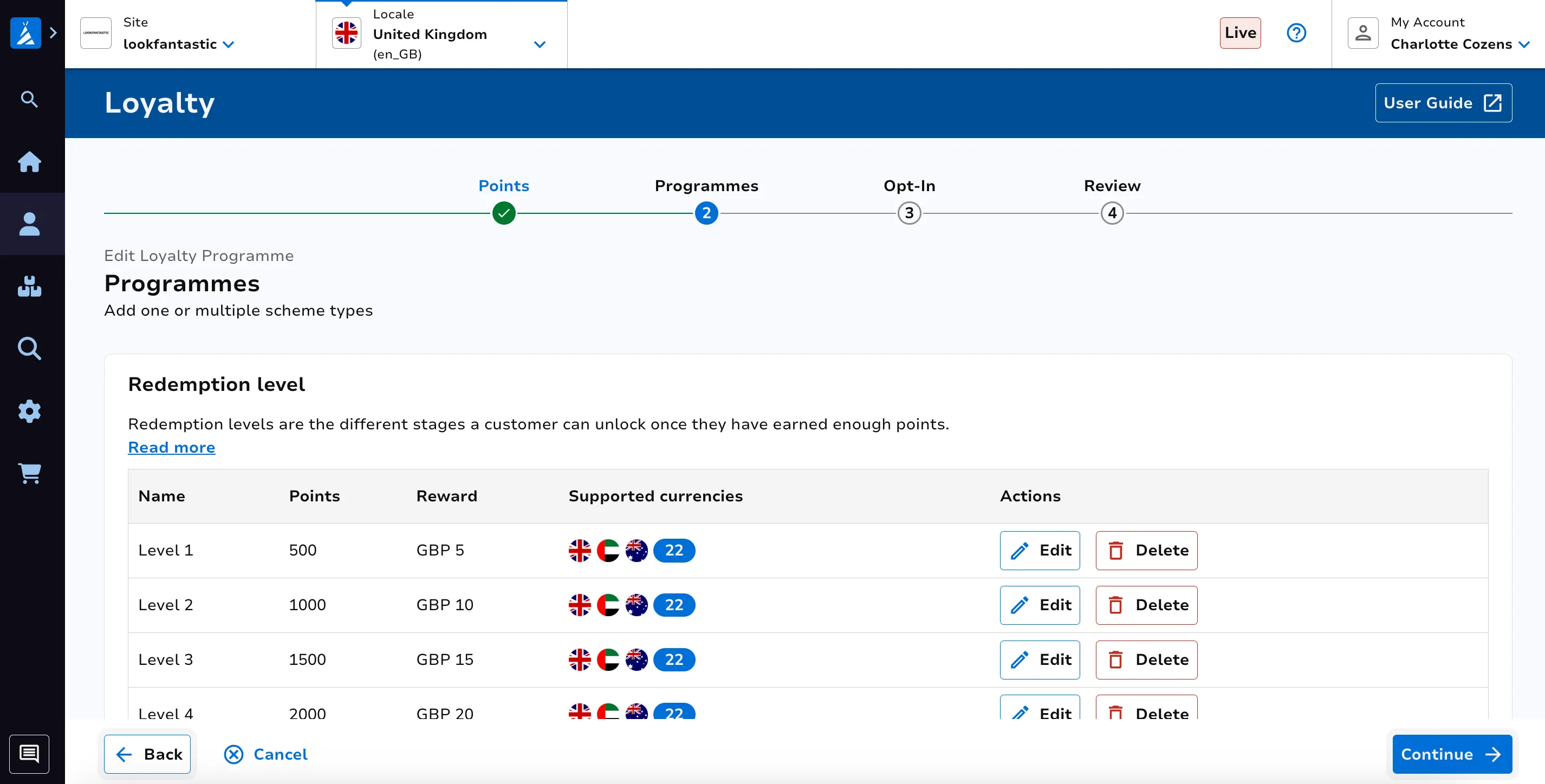
This step configures the structure of the programme.
Redemption Levels (Redeemable and Hybrid only)
Section titled “Redemption Levels (Redeemable and Hybrid only)”Redemption levels define the rates at which customers can convert points into account credit. Each level specifies:
- the number of points required
- the reward amount in account credit
- the currency (must include the default currency of the subsite)
Multiple levels can be created to encourage customers to save points for higher-value rewards. For example:
- 500 points = 5 GBP account credit
- 950 points = 10 GBP account credit
- 1400 points = 15 GBP account credit
Each redemption level can have different reward amounts for different currencies supported by the subsite.
Programme Tiers (Multi-Tiered and Hybrid only)
Section titled “Programme Tiers (Multi-Tiered and Hybrid only)”Tiers are linked to customer lists. Special offers can be assigned to the appropriate customer lists after you have set up your programme.
Each tier requires:
- a name
- a points threshold (the minimum number of points required to qualify)
- a customer list ID
The base tier (Tier 1) has a threshold of 0 and all customers are assigned to it by default when they join the programme. Higher tiers require progressively more points.
Important: once created, tiers cannot be edited. Ensure the names, thresholds, and customer lists are correct before saving.
Top Tier Invite List
Section titled “Top Tier Invite List”The top tier can optionally be configured with an invite list. This allows you to promote customers directly to the top tier, bypassing the standard points-based qualification.
To set this up:
- Create a customer list of type “Loyalty Invite List” in the Customer Lists section of Teepee
- Enter the Invite List ID in the “Top Tier Invite List” section of the programme setup
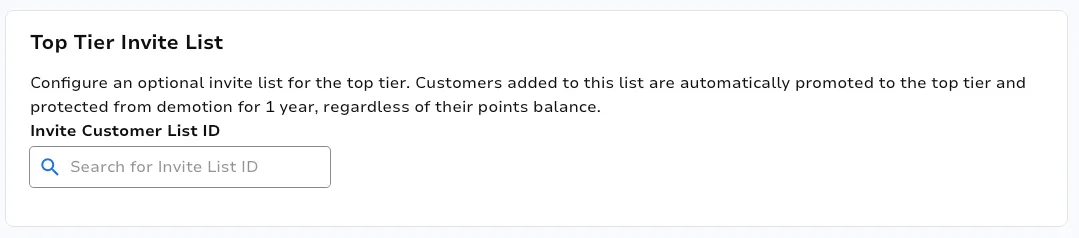
Customers on the invite list are promoted to the top tier regardless of their points balance. They remain in the top tier as long as they are on the list. If they are removed from the list, they are re-evaluated based on their points balance and placed in the appropriate tier.
Step 3: Opt-In
Section titled “Step 3: Opt-In”Choose how customers join the loyalty programme:
- Automatic – customers are automatically included and start earning points as soon as their account is created
- Soft – customers are automatically included but cannot see or use their points until they explicitly opt in. Points accumulate in the background
- Hard – customers are not included until they opt in. Points do not accumulate until they have opted in
Soft and Hard opt-in require the account registration feature to be enabled on the site.
Step 4: Review
Section titled “Step 4: Review”Review all settings before activating the programme. Once a programme is activated, most parameters cannot be changed.
You can pause or delete a loyalty programme using the corresponding buttons on the landing page.
Earning Points
Section titled “Earning Points”The most common way for customers to earn points is through purchasing products. Points are calculated using the earn rate and the order total. By default, points are awarded when an order is dispatched. If a holding window is configured, points become available after the holding window period has passed following dispatch.
Customers can also earn points by completing actions on the site. These are configured per site:
- Completing a main profile – points awarded for filling out personal information
- Completing a goal selector profile – points awarded for completing a goal selector
- Signing up to the newsletter – points awarded for subscribing to the email newsletter
- Downloading the app – points awarded for downloading the mobile app
- Loyalty opt-in – points awarded for opting into the loyalty programme (soft and hard opt-in only). Points are awarded on the first opt-in only
- Leaving reviews – points awarded for leaving a verified review on a purchased product. Limited to one review per product per customer
- Account creation – points awarded for creating an account
Custom Earn Rates
Section titled “Custom Earn Rates”Custom earn rates allow flexible points configuration beyond the standard earn rate.
The following earn rate types are available:
- Base Rate – the default earn rate for the programme. Cannot be combined with other types. Can be set up as a temporary rate with a start and end date
- Customer List – targets specific customer segments by associating an earn rate with a customer list
- Sku List – applies an earn rate to specific product categories or sections
- Web Only – restricts the earn rate to web-based purchases only (excludes mobile app transactions)
- App Only – restricts the earn rate to mobile app purchases only (excludes web transactions)
- Subscription – applies an earn rate to subscription products starting from the second child order. Cannot be combined with other types. If not configured, the base rate applies to subscription products
Configuration rules:
- Base Rate and Subscription operate independently and cannot be combined with other types
- Custom mode allows combining Customer List, Sku List, Web Only, and App Only
- All earn rates require a name, a points value, and a start date
- End date is optional if the rate should run indefinitely
Points Expiry
Section titled “Points Expiry”Each programme specifies how long points remain valid. When points expire and a customer’s total drops below their current tier threshold, the customer may be moved to a lower tier at the next evaluation.
Upload Loyalty Points
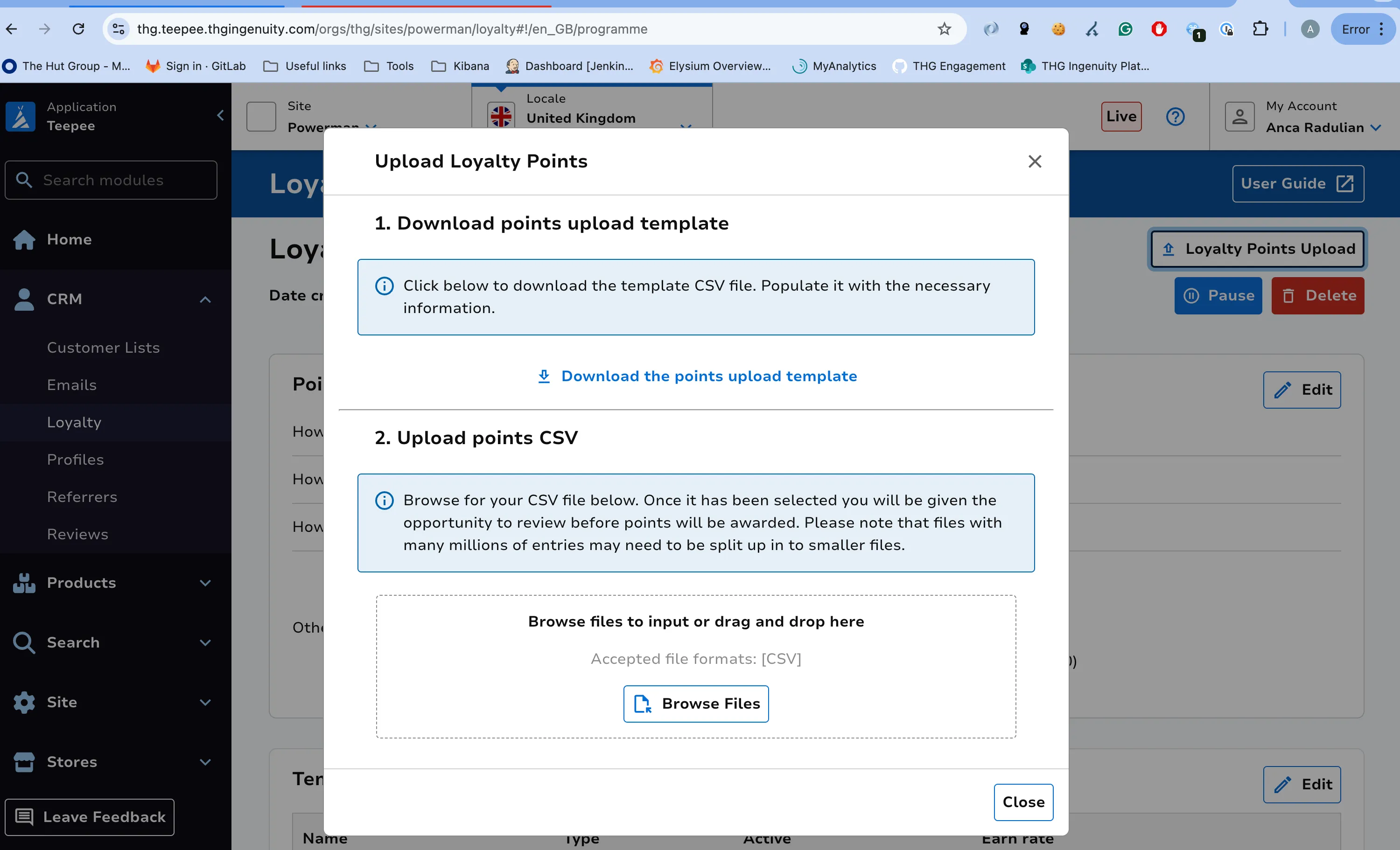
Section titled “Upload Loyalty Points”To upload miscellaneous loyalty points in bulk, click the “Loyalty Points Upload” button on the programme landing page. A CSV template is provided which you can download and edit locally.
Once your file is updated, upload it following the on-screen instructions. Ensure the data you upload matches the specified format.
Products Excluded From Loyalty
Section titled “Products Excluded From Loyalty”Products can be excluded from earning loyalty points by configuring an exclusion product list on the programme landing page.
How Tier Evaluation Works
Section titled “How Tier Evaluation Works”Tier evaluation determines which tier a customer belongs to based on their total points earned (including redeemed points). Evaluations are triggered when a customer earns or loses points, and are also scheduled automatically.
Promotion
Section titled “Promotion”When a customer’s points reach or exceed a tier threshold, they are promoted to that tier. On promotion, the customer receives a guaranteed tier period (configurable per programme, typically one year) during which they remain in the tier even if some points expire in the meantime.
Retention
Section titled “Retention”If a customer is evaluated again before their tier period ends, they usually remain in the same tier until the existing tier expiry date.
If the customer is expected to still meet the threshold when the current tier period expires, the system can extend the tier early by another full period.
If a full tier period has passed and the customer still meets the threshold, they are re-qualified and receive another full tier period from the new evaluation date.
Demotion
Section titled “Demotion”If a customer’s points drop below the threshold and their tier period has expired, they are moved to the highest tier they still qualify for. If they no longer qualify for any tier above the base, they return to the base tier.
When a customer is demoted to a lower tier, that lower tier does not receive a new guaranteed tier period. Instead, the tier expiry is based on when the customer’s remaining points are expected to expire below that tier’s threshold. This means demoted customers can be demoted again more quickly if their points continue to drop.
Refund Window
Section titled “Refund Window”When a customer’s points drop below a tier threshold, the system checks whether this is due to a recent refund before demoting them.
There is a 40-day refund window from the customer’s last evaluation date. During this window, the system adds back any refunded points. If the customer would still be below the threshold even with those points added back, they keep their tier (the refund alone did not cause the shortfall). If adding back the refunded points puts them at or above the threshold, the refund is what caused the drop and the customer is demoted.
This protection only applies to customers who earned their tier through points. Customers who were demoted into a tier from a higher one are not protected by the refund window.
Invite List and Tiers
Section titled “Invite List and Tiers”Customers on the top tier invite list are treated as qualifying for the top tier regardless of their points balance. They receive the standard tier period protection. If they are removed from the invite list, they are re-evaluated based on points at the next evaluation.
Evaluation Schedule
Section titled “Evaluation Schedule”Evaluations are triggered by customer activity (purchases, refunds, redemptions) and are also scheduled automatically at the end of each tier period. This ensures that customers are always re-assessed at the right time, even if no new activity occurs.
Special Offers and Loyalty Points
Section titled “Special Offers and Loyalty Points”Special offers can be set up so that customers benefit from additional loyalty points.
Website Loyalty Experience
Section titled “Website Loyalty Experience”For details on how the loyalty programme appears to customers on the website (progress bars, dashboards, points history, redemption UI), please reach out to the frontend team.